Dairy is one of the most shelf-life-sensitive industries in food manufacturing. A carton of pasteurized milk has a 7- to 14-day window. Cheese may have months. Yogurt sits somewhere in between. And every SKU in your portfolio carries a different countdown clock, one that, if mismanaged, costs you product, customer trust, and regulatory standing.
Yet in many dairy operations today, expiry management still depends on manual tracking, whiteboard schedules, or disconnected spreadsheets. Staff rely on visual checks at the cold store. Near-expiry stock gets discovered during dispatch, too late to reroute or discount. Recall events become days of frantic paper-chasing rather than minutes of system-driven precision.
A well-configured Dairy ERP solves all of this. This guide explains exactly how, covering every stage from production batch creation to last-mile delivery, and where the system pays for itself fastest.
What Are Expiry Date and Shelf Life Management in Dairy ERP?
Shelf life management in a Dairy ERP is the capability to assign, track, enforce, and act on expiry dates for every product batch, from the moment it’s produced or received through storage and distribution to the point of customer delivery.
It goes well beyond printing a date on a label. A properly implemented ERP shelf life module:
- Assigns manufacturing date, best-before date, and use-by date to every production batch automatically
- Tracks remaining shelf life in real time across all storage locations
- Enforces FEFO (First Expired, First Out) picking at the warehouse
- Triggers alerts when stock approaches configurable near-expiry thresholds
- Blocks the dispatch of stock that falls below the minimum remaining shelf life requirements set by customers or trade channels
- Links expiry data to batch traceability, enabling rapid recall execution
- Feeds expiry-linked data into wastage reporting, production planning, and procurement adjustments
Done well, it transforms expiry management from a reactive, manual process into a system-driven discipline embedded in every warehouse, production, and distribution workflow.
Batch Creation and Automatic Expiry Date Assignment at Production
The shelf-life clock starts the moment a batch is produced. This is where ERP-driven expiry management either begins correctly or where errors compound through the entire supply chain.
What good looks like:
- When a production batch is confirmed in the ERP, the system automatically calculates the best-before and use-by dates based on the product master’s configured shelf life. You do not need manual date calculation or entry errors.
- Shelf life parameters can be set differently by product, by packaging format, and by processing method. UHT milk processed at 140°C has a different shelf life assignment than pasteurized milk processed at 72°C, and the ERP knows the difference.
- Batch records capture not just the calculated expiry date but also the actual production parameters that affect shelf life: processing temperature, holding time, packaging integrity checks, and cold store transfer time. If something deviates, the ERP can flag a shorter shelf life or quarantine the batch for QC review.
- Every batch is issued a unique lot number that carries its expiry date through every downstream transaction, including goods receipt, transfer, pick, and dispatch.
The risks you eliminate: Handwritten batch cards, manual date stamps on warehouse boards, and the human error that follows both.
Want to see how Dairytech automates batch expiry assignment at production? Book a Live Product Demo
FEFO Inventory Management: First Expired, First Out
FEFO is the foundational principle of shelf-life management in any perishable goods operation, and it’s where most manual systems break down. Warehouse staff under time pressure don’t always pick the oldest stock first. When they don’t, newer stock flows out while older stock ages toward expiry in the back of the cold store.
How Dairy ERP enforces FEFO:
- The ERP’s warehouse management module sorts all available inventory by expiry date, picking tasks for the soonest-expiring stock first, regardless of where it sits in the cold store. Pickers receive instructions that reflect FEFO logic and not location convenience.
- FEFO rules can be configured with customer or channel-specific overrides. A modern retail chain that requires a minimum of 70% remaining shelf life at delivery has stricter pick rules than a bulk institutional buyer with lower shelf life requirements.
- When multiple batches of the same product are available, the ERP prevents the operator from selecting a longer-dated batch when a shorter-dated one is available, blocking what would otherwise be an invisible but costly inventory error.
- Every pick is logged against the specific batch and expiry date, creating a complete chain of custody from cold store to delivery note.
The business case: Reducing expiry-related write-offs by even 0.5% of monthly production volume in a midsize dairy typically pays for an ERP shelf-life module within the first year of operation.
Near-Expiry Alerts and Automated Stock Escalation
The window between “stock is fine” and “stock is unsellable” is narrow in dairy. Without automated alerts, operations teams discover near-expiry stock when it’s too late to act profitably.
What an ERP near-expiry alert system looks like:
- Configurable alert thresholds by product: Pasteurized milk might trigger an alert at 3 days remaining. Hard cheese at 30 days. Yogurt at 5 days. Each product’s alert horizon is set in the product master and managed centrally.
- Multi-channel alert delivery: Alerts go to warehouse managers, sales operations, and production planners simultaneously, via the ERP dashboard, email, or SMS integration, ensuring no single point of failure in the notification chain.
- Automatic stock status changes: When stock crosses a near-expiry threshold, the ERP can automatically change its status from “available” to “near-expiry review,” preventing it from being committed to standard orders and awaiting a repricing or reallocation decision.
- Escalation workflows: If near-expiry stock isn’t actioned within a defined window, the ERP escalates the alert to a senior manager. No more alerts that sit unread in an inbox until the stock has already expired.
The downstream actions the ERP can trigger from a near-expiry alert are the following:
- Generate a discount pricing recommendation for the sales team
- Suggest reallocation to a distribution channel with lower shelf life requirements (bulk/foodservice vs. retail)
- Create a transfer order to a location closer to high-velocity outlets
- Flag for production planning to adjust tomorrow’s production run
Tired of discovering near-expiry stock at dispatch time? See How Dairytech’s Alert Engine Works
Minimum Remaining Shelf-Life (MRSL) Controls for Customers and Channels
Different customers and trade channels have different minimum shelf-life requirements at the point of delivery. A modern grocery retailer may demand 75% of the remaining shelf life on delivery. An institutional buyer may accept 50%. An export customer may require 90%. Managing these rules manually, across dozens of SKUs and hundreds of delivery points, is operationally unworkable.
How Dairy ERP handles MRSL:
- Customer-level and channel-level MRSL percentages or absolute day minimums are configured in the ERP customer master. These rules are applied automatically at the order allocation and dispatch stages.
- When a sales order is processed, the ERP checks available stock against the customer’s MRSL requirement. Stock that doesn’t meet the threshold is not allocated to that order; it is either flagged for an alternative channel or escalated for a management decision.
- At the dispatch stage, a final MRSL compliance check prevents shipment of non-compliant stock even if it was incorrectly allocated earlier in the process. This creates a double-layer protection against costly customer rejections.
- MRSL compliance data is captured in the ERP for every delivery, providing a clean audit trail for customer disputes and enabling trend analysis across channels.
The cost of getting this wrong: Retail customer rejections due to short shelf life aren’t just a lost sale. They typically include handling return costs, restocking fees, and reputational consequences for buyer review time. One large retailer rejection can cost more than months of ERP licensing.
Multi-SKU and Variable Shelf-Life Product Management
Dairy portfolios are rarely simple. A single processing plant may produce pasteurized milk, UHT milk, flavored milk, paneer, butter, ghee, cream, yogurt, lassi, and multiple cheese varieties, each with radically different shelf lives, storage requirements, and expiry management rules.
Where ERP multi-SKU shelf-life management pays off:
- Per-SKU shelf life parameters: Each product in the ERP master has its own shelf life configuration, such as manufacturing shelf life, sellable shelf life, and minimum acceptable shelf life at dispatch, independent of other SKUs.
- Packaging format variants: The same product in different packaging formats may have different shelf lives. The ERP handles this at the SKU variant level.
- Storage-condition-linked shelf life: For products sensitive to temperature variations (soft cheeses, flavored yogurts), the ERP can integrate with cold store temperature data to flag batches that experienced a temperature excursion, and automatically adjust their effective shelf life or quarantine them for QC review.
- Cross-SKU expiry-based production planning: When the ERP’s production planning module has visibility into the remaining shelf life of current inventory, it can recommend production run adjustments, delaying a production run if near-expiry stock hasn’t cleared, or accelerating one if stock is thinning. This prevents the classic dairy problem of producing into existing near-expiry inventory.
Managing a diverse dairy product portfolio with multiple shelf-life rules? Talk to a Dairytech Implementation Specialist
Shelf Life Management in Distribution and Last-Mile Delivery
Shelf life management doesn’t end when stock leaves the cold store. The distribution leg, from dispatch to retailer or consumer delivery, introduces its own expiry risks, particularly in ambient or inconsistently refrigerated logistics environments.
How Dairy ERP manages shelf life through distribution:
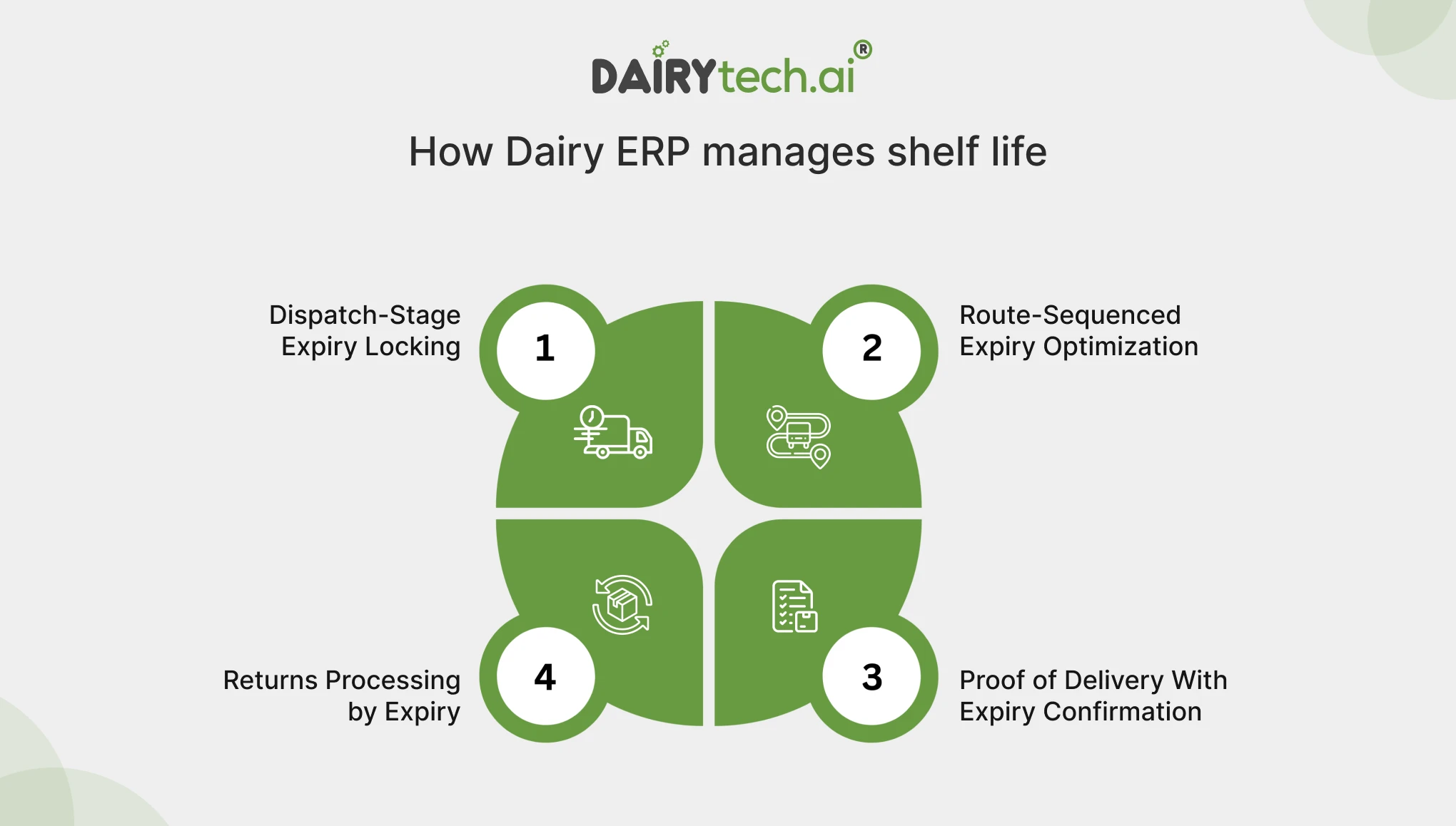
- Dispatch-stage expiry locking: At the point of generating a delivery note or dispatch instruction, the ERP locks the specific batch and expiry date to that shipment. This prevents warehouse staff from substituting batches at loading time.
- Route-sequenced expiry optimization: For multi-stop delivery routes, the ERP’s distribution module can sequence delivery stops to prioritize the shortest-shelf-life stock to the closest or highest-velocity drop point first, maximizing the sellable life of each consignment.
- Proof of delivery with expiry confirmation: Mobile delivery apps integrated with the ERP capture delivery confirmation, including batch and expiry details, at the point of handover. The retailer or customer receives a delivery note that includes the lot number and best-before date, creating a shared record that eliminates disputes.
- Returns processing by expiry: When stock is returned from the trade, the ERP intake process for returns captures the remaining shelf life at the time of return. Stock with sufficient remaining shelf life can be returned to available inventory; stock below a threshold is automatically routed to write-off or disposal workflows.
Expiry-Linked Batch Traceability and Recall Management
A product recall is a high-stakes event in the dairy industry. Regulators expect traceability within hours. Retailers expect it in minutes. Without batch-level expiry tracking embedded in your ERP, identifying which stock is affected, where it is, and who received it becomes a days-long manual investigation.
What ERP batch traceability looks like in practice:
- Every batch in the ERP carries a unique lot number that links to its production date, expiry date, raw material inputs, processing parameters, quality test results, storage locations, and all outbound delivery records.
- A recall trigger, whether from an internal quality flag or an external regulatory notice, activates a batch trace query in the ERP. Within seconds, you’ll have a complete list of all affected batches, their current locations (cold store, in transit, or delivered), and the customers or outlets to which they were shipped.
- The ERP generates recall communication lists indicating which customers received affected stock, in what quantities, on what delivery dates, and with what batch numbers.
- This is ready to share with your quality team, logistics team, and regulatory body in one step.
- Stock still in the warehouse is automatically quarantined in the system; its status changed to “recalled/hold”, preventing any further dispatch without requiring physical intervention first.
The regulatory dimension: FSSAI, FDA, and most export market regulators require documented, time-stamped traceability records. ERP-linked batch expiry management creates these records as a by-product of normal operations, not as a separate documentation exercise before every audit.
How fast could your team execute a recall today? See Dairytech’s Batch Traceability Module in Action
Expiry-Driven Wastage Reporting and Loss Reduction
Expiry-related wastage in dairy is often under-reported because it’s quietly written off at month-end, buried in a cost-of-goods line, or simply not measured with enough granularity to act on. ERP shelf life data changes that.
What expiry-driven reporting looks like:
- Wastage by product and SKU: The ERP tracks every unit written off due to expiry, categorized by product, production batch, and storage location. This identifies which SKUs consistently generate write-offs, allowing root-cause production analysis, demand forecasting, or shelf-life configuration.
- Wastage by storage location: If one cold store bay consistently produces more expiry write-offs than others, the ERP surfaces it. This might indicate a cooling problem, a picking sequence issue, or a stacking practice that buries older stock.
- Near-expiry resolution rate: The ERP tracks the proportion of near-expiry alerts that result in successful reallocation or discounting versus write-off. Over time, these measures show how effectively the operations team is acting on alerts and where the process needs tightening.
- Trend analysis and production planning feedback: Month-on-month wastage trends feed back into the production planning module, informing decisions about production run sizes, frequency, and SKU mix. If a particular SKU consistently generates 3% expiry waste, that’s a production planning problem and a warehouse management one.
Regulatory Compliance and Date Labeling Accuracy
Date labeling errors include wrong best-before dates, missing use-by dates, and inconsistent formats. These are the most common causes of regulatory action against dairy processors. They’re also entirely preventable with ERP-linked label printing.
How Dairy ERP ensures date labeling accuracy:
ERP-driven label printing: Labels are generated directly from the ERP batch record, not from a separate system or manual input. The best-before date printed on the label matches the date recorded in the batch record, eliminating the possibility of label printing and batch discrepancies.
Format compliance by market: For export products or products sold across multiple state markets with different labeling regulations, the ERP can configure date format rules by customer, channel, or destination, ensuring the right format (DD/MM/YYYY vs. MM/DD/YYYY; “Best Before” vs. “Use By”) appears on the right label automatically.
Audit trail for date labeling: Every label print event is logged in the ERP against the batch, operator ID, printer, and timestamp. In the event of a labeling query or regulatory inspection, this audit trail is available instantly.
Label reprint controls: Reprinting a product label, which creates a fraud and error risk, requires supervisor authorization in the ERP and generates an audit log entry. Unauthorized label reprints become visible and auditable.
Struggling with date labeling accuracy or audit readiness? Download Dairytech’s Dairy Compliance Checklist
Integration With Sales, Procurement, and Production Planning
Shelf life management is not a standalone function. Its real value emerges when expiry data flows across every connected module in the ERP, influencing decisions in sales, procurement, and production before problems occur.
Cross-module integration that makes expiry management proactive:
- Sales order promising: When a sales order is placed, the ERP checks stock availability and stock that meets the customer’s MRSL requirement. If available stock will not meet the customer’s shelf-life requirement on the promised delivery date, the system flags it at order entry, not at dispatch, when it’s too late.
- Procurement and intake triggers: For processed ingredients with shelf lives (cultures, stabilizers, packaging with printed dates), the ERP checks goods receipt. Incoming materials that don’t meet minimum remaining shelf-life requirements for their intended production use are flagged for rejection or quarantine before entering the production stream.
- Demand-driven production scheduling: When near-expiry inventory for a particular SKU is high, the ERP’s production planning module receives a signal to hold or reduce the next production run for that SKU, preventing the buildup of expiring stock that creates waste and margin erosion.
- Finance and costing integration: Near-expiry stock revaluation, where stock approaching its expiry is written down to net realizable value, can be automated based on ERP expiry thresholds, keeping inventory valuations accurate without manual accounting adjustments at period end.
Where Expiry Management Goes Wrong (And How ERP Fixes It)
Understanding the failure modes helps explain why ERP-driven shelf life management creates such tangible value:
- Manual date tracking fails because it depends entirely on individual discipline and doesn’t scale. One missed update cascades into a cold store full of wrongly prioritized stock.
- Disconnected label printing creates labeling errors that result in customer complaints, regulatory notices, and product withdrawals, risks that are difficult to price but frequently realized.
- FEFO without system enforcement reverts to FIFO by convenience; staff pick the nearest, most accessible stock, not the soonest-expiring. The result is invisible until write-offs accumulate.
- Without MRSL controls at dispatch, short-shelf-life stock reaches customers who reject it, increasing return costs and damaged commercial relationships that far outweigh the value of the original shipment.
- Without batch traceability tied to expiry, a recall becomes a crisis. It becomes a manageable process.
Ready to move from manual expiry tracking to system-driven shelf life management? Schedule a Free Dairytech Platform Assessment
Conclusion
Expiry date and shelf life management is one of those operational disciplines that looks simple from the outside, print a date, pick the oldest stock first, and don’t ship expired product, but reveals enormous complexity at scale. Multi-SKU portfolios, diverse customer shelf life requirements, short processing windows, and regulatory traceability obligations combine to make manual management genuinely unworkable for any dairy operation of significant size.
A well-implemented Dairy ERP transforms shelf life management from a reactive, error-prone process into a system-driven discipline. Batch expiry data becomes the backbone of warehouse management, distribution control, production planning, and compliance reporting, not a separate tracking exercise bolted on at the end.
The dairies that get this right don’t just reduce write-offs. They build stronger commercial relationships with retail customers who trust consistent shelf life compliance, respond to recalls faster than competitors, and run production lines tuned to actual demand rather than to a best-guess of what won’t expire on the shelf.
Dairytech’s shelf life management module is purpose-built for dairy processors and cooperatives, handling everything from multi-SKU expiry configuration to FEFO enforcement and FSSAI-ready traceability. Book Your Free Shelf Life Management Demo with Dairytech Today
Frequently Asked Questions (FAQs)
Q1. What is shelf-life management in a Dairy ERP?
A1. Shelf life management in a Dairy ERP is the end-to-end capability to assign expiry dates to production batches, track remaining shelf life across all inventory locations, enforce FEFO picking, trigger near-expiry alerts, control dispatch based on customer shelf life requirements, and support recall execution — all within a single integrated system rather than through manual processes or disconnected tools.
Q2. How does Dairy ERP automatically assign expiry dates to batches?
A2. When a production batch is confirmed in the ERP, the system calculates the best-before and use-by dates by adding the product’s configured shelf life (defined in the product master) to the production date. This eliminates manual date calculation and ensures that the expiry date on every batch record, every warehouse transaction, and every delivery document is consistent and accurate.
Q3. What is FEFO, and why does it matter in dairy operations?
A3. FEFO stands for First Expired, First Out. It means picking and dispatching stock in the order of its expiry date, shortest-dated first, rather than by location or by when stock arrived (FIFO). In dairy, where shelf lives are short and the margin for error is narrow, FEFO is essential. Without system enforcement, warehouse staff default to convenience-based picking, older stock gets buried, and expiry write-offs accumulate silently.
Q4. How does Dairy ERP reduce expiry-related wastage?
A4. ERP reduces expiry wastage through a combination of FEFO enforcement, near-expiry alerts with configurable thresholds, automatic stock status changes that trigger repricing or reallocation decisions, and expiry-linked production planning signals that prevent overproduction into existing near-expiry inventory. Together, these mechanisms ensure that near-expiry stock is proactively redirected, discounted, or reallocated.
Q5. What is Minimum Remaining Shelf Life (MRSL), and how does ERP manage it?
A5. MRSL is the minimum shelf life that a product must have remaining at the point of delivery to a specific customer or channel. Retailers, exporters, and institutional buyers typically define their own MRSL requirements. These specifications are stored at the customer or channel level by a dairy ERP, which applies them during order allocation and dispatch, stops the shipment of stock that falls short of the customer’s threshold, and prevents expensive market rejections.
Q6. Can Dairy ERP support a product recall based on expiry data?
A6. Yes. Because every production batch in a Dairy ERP is linked to its expiry date, manufacturing parameters, quality records, storage history, and dispatch records, a recall query returns the complete picture of which batches are affected, where they are in the supply chain, and which customers received them, within seconds. The ERP can simultaneously quarantine remaining stock in the warehouse and generate customer communication lists, compressing a multi-day manual recall investigation into a minutes-long system query.
Q7. How does shelf-life management in ERP help with FSSAI and food safety compliance?
A7. ERP shelf-life management creates an automatic, tamper-proof audit trail for every batch: production date, expiry date, processing parameters, quality test results, storage temperatures (if integrated with IoT sensors), label print records, and dispatch documentation. This provides the documented traceability and date labeling accuracy that FSSAI, FDA, and export market regulators require — without the manual effort of maintaining paper-based records.
Q8. Is shelf life management in Dairy ERP suitable for multi-product operations?
A8. Yes. Each product in the ERP master has its own shelf-life configuration, independently of other SKUs. Pasteurized milk, UHT, yogurt, butter, ghee, and cheese can have different shelf lives, alert thresholds, MRSL rules, and date labeling formats, all managed within the same system. This is one of the key advantages of a purpose-built Dairy ERP over generic ERP systems, which often require customization to handle variable shelf life parameters across diverse dairy portfolios.
Q9. How does ERP handle returned stock with remaining shelf life?
A9. When goods are returned from the trade, the ERP return intake process captures the lot number and the remaining shelf life receipt. Stock with sufficient remaining shelf life (above a configured acceptance threshold) can be returned to available inventory for resale. Stock below the threshold is automatically routed to a disposal, write-off, or secondary channel workflow, preventing expired or near-expired returns from re-entering the supply chain.